Resource Topology
The Topology view renders an interactive ownership graph for any resource, making it easy to understand relationships between Kubernetes objects at a glance.
Opening the Topology View
- Open any resource detail page (Deployment, Service, Pod, etc.)
- Click the Topology tab
The graph renders immediately using data already in the Informer cache — no additional API calls.
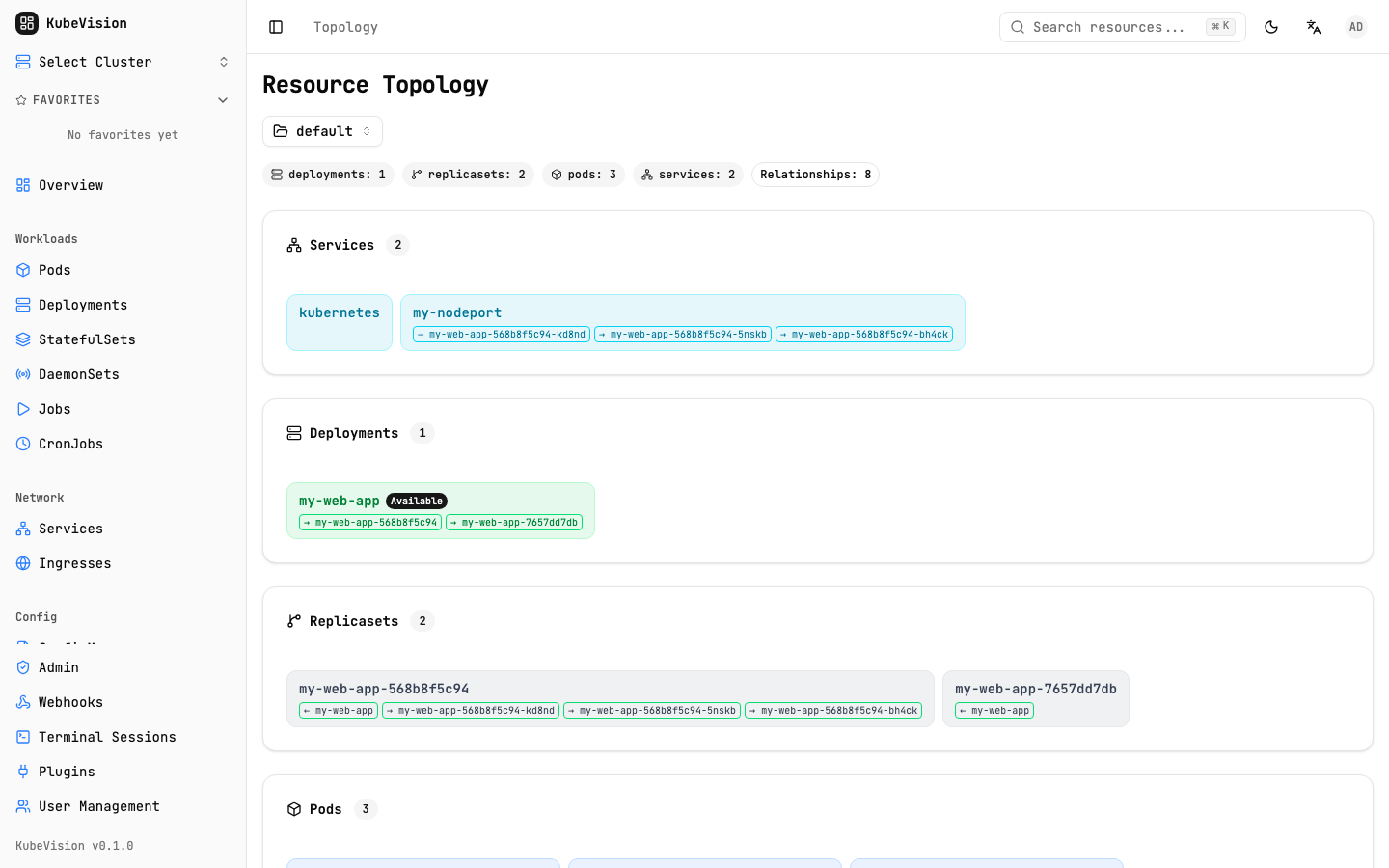
The topology view groups related Services, Deployments, ReplicaSets, and Pods while preserving their relationships.
Ownership Relationships
KubeVision traces ownership via metadata.ownerReferences and well-known label selectors:
Deployment ──owns──▶ ReplicaSet ──owns──▶ Pod
                                           │
CronJob ──owns──▶ Job ──owns──▶ Pod        │
                                           │
Service ──selects──▶ Endpoints ──▶ Pod ◀──┘
                                           │
PersistentVolumeClaim ──bound──▶ PersistentVolume
Supported Relationship Types
| Source | Relationship | Target |
|---|---|---|
| Deployment | owns | ReplicaSet |
| ReplicaSet | owns | Pod |
| StatefulSet | owns | Pod |
| DaemonSet | owns | Pod |
| Job | owns | Pod |
| CronJob | owns | Job |
| Service | selects | Pod |
| Ingress | routes to | Service |
| PVC | bound to | PV |
Graph Interaction
| Interaction | Action |
|---|---|
| Click a node | Open the resource detail panel on the right |
| Scroll | Zoom in / out |
| Drag background | Pan the viewport |
| Drag node | Reposition a node (layout is not saved) |
| Double-click node | Navigate to the full resource detail page |
Node Color Coding
| Color | Status |
|---|---|
| Green | Running / Available / Bound |
| Yellow | Pending / Progressing |
| Red | Failed / Error / Terminating |
| Grey | Unknown or no status condition |
Use Cases
- Debug a failing Deployment — instantly see which Pods are in error state without navigating each one
- Trace traffic path — follow Ingress → Service → Pod to verify routing
- Audit storage — confirm PVC/PV binding across a namespace
tip
For large deployments with many replica Pods, the graph groups them and shows a count badge to keep the view readable.
Related
- Resource Management — List and edit resources