Terminal Recording
Every interactive terminal session opened through KubeVision — whether to a Pod container or a Node shell — is recorded automatically. Recordings can be played back in the browser for compliance review, training, or incident investigation.
How It Works
Browser WebSocket  →  KubeVision backend  →  Kubernetes exec API
        ↑                    |
        |              tee to recorder
        |                    ↓
   live output         terminal_sessions table
                       (asciinema v2 format)
All keystrokes and output are captured server-side by teeing the WebSocket stream into the recorder. The client is unaware of the recording.
Storage Format
Sessions are stored in the terminal_sessions database table using the asciinema v2 format — an open, line-delimited JSON standard widely supported by playback tools.
| Column | Type | Description |
|---|---|---|
id | UUID | Session identifier |
user | string | Username who opened the session |
cluster | string | Target cluster |
namespace | string | Target namespace |
pod | string | Pod name |
container | string | Container name |
cast | text | Full asciinema v2 cast data |
started_at | timestamp | Session start time |
ended_at | timestamp | Session end time (null if still active) |
expires_at | timestamp | Auto-delete date |
Retention
The default retention period is 30 days. Sessions older than expires_at are removed by a nightly cleanup job.
To change the default:
# config.yaml
terminal:
  retention_days: 30   # set to 0 to keep recordings indefinitely
Setting retention_days: 0 will grow the database indefinitely. Monitor disk usage if you disable automatic cleanup.
Web Player
Click any session row in the session list to open the built-in player:
- Play / Pause — spacebar or the play button
- Speed control — 0.5×, 1×, 2×, 4× playback speed
- Seek — click anywhere on the timeline scrubber
- Download — export the
.castfile to play locally withasciinema play
The player is rendered entirely in the browser — no server streaming during playback.
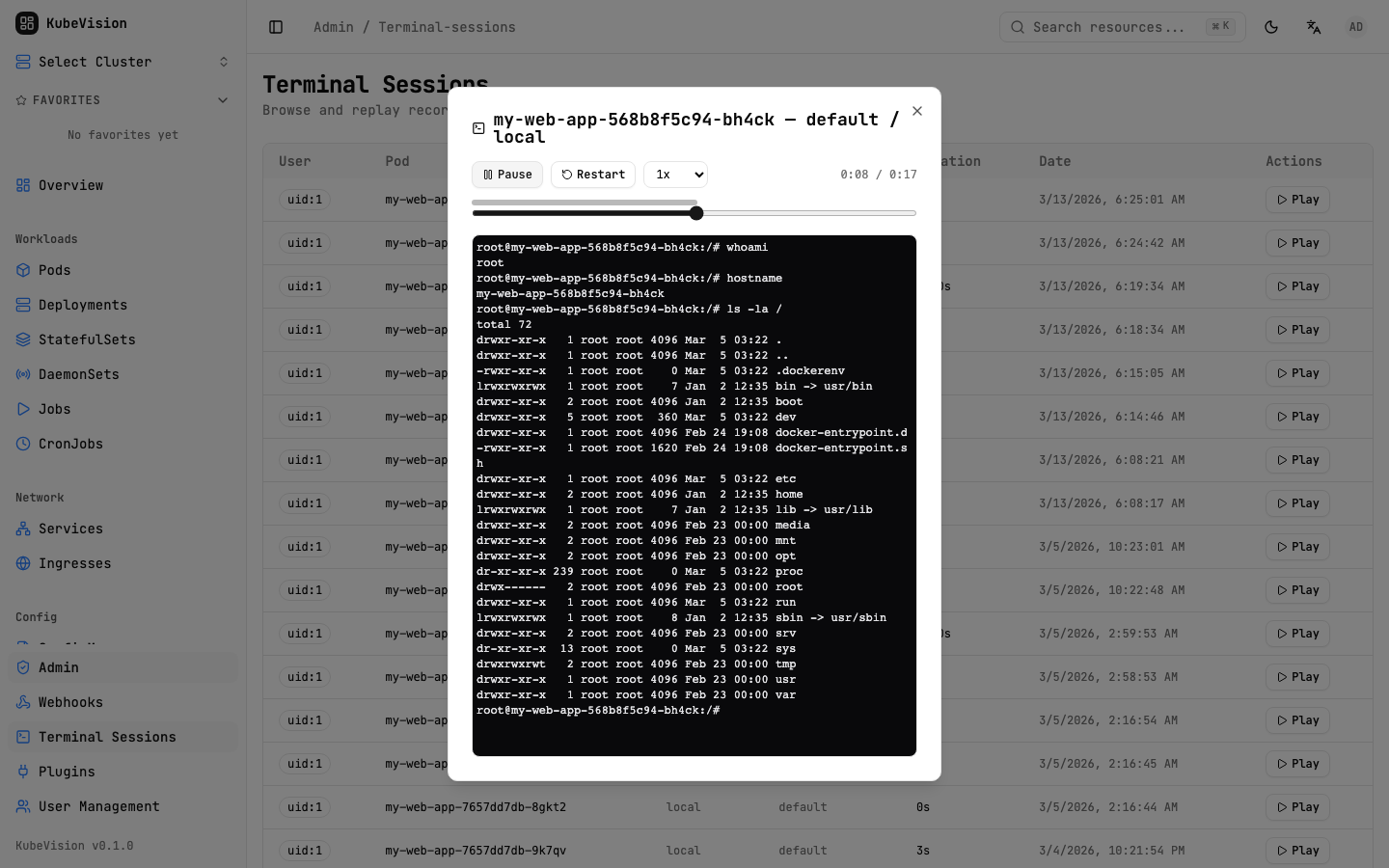
Administrators can locate recorded sessions in the audit list and replay them directly in the browser.
Access Control
| Role | What They Can See |
|---|---|
admin | All sessions across all users and clusters |
ops | All sessions within their assigned clusters |
dev, readonly | Only their own sessions |
Admins access the full session list from Settings → Terminal Sessions. All other users see their sessions under Profile → Terminal Sessions.
Use the session list filters (user, cluster, pod, date range) to quickly locate a specific session during an incident review. Session duration is shown in the list so you can skip very short or accidental sessions.
Exporting for External Tools
Download the .cast file from the player and replay it anywhere:
# Install asciinema CLI
pip install asciinema

# Play locally
asciinema play session-abc123.cast

# Upload to asciinema.org (optional)
asciinema upload session-abc123.cast
Related
- RBAC — Controls who can open terminal sessions
- Audit Logging — Session start/end events are in the audit log